> ## Documentation Index
> Fetch the complete documentation index at: https://developer.pdf.co/llms.txt
> Use this file to discover all available pages before exploring further.
# Claude Code
> Register PDF.co as a local MCP server for Claude Code on Windows.
Install [Claude Code](https://code.claude.com/docs/en/setup) and complete the [PDF.co MCP prerequisites](/api/mcp/overview#before-you-start).
These instructions use native Windows PowerShell. Check that both commands are available:
```powershell theme={null}
claude --version
uvx --version
```
## Register the server
Run the following in PowerShell after replacing `YOUR_PDFCO_API_KEY` locally:
```powershell theme={null}
$pdfcoUvx = (Get-Command uvx -ErrorAction Stop).Source
claude mcp add --scope user --env "X_API_KEY=YOUR_PDFCO_API_KEY" --transport stdio pdfco -- "$pdfcoUvx" pdfco-mcp
```
 | Part | Purpose |
| - | - |
| `--scope user` | Makes PDF.co available across your Claude Code projects. |
| `--transport stdio` | Starts a local MCP process. |
| `--env "X_API_KEY=..."` | Supplies your PDF.co key to that process. |
| `pdfco` | Names the server in Claude Code. |
| `--` | Separates Claude Code options from the server command. |
| `"$pdfcoUvx" pdfco-mcp` | Runs the package using the absolute path to `uvx.exe`. |
If `pdfco` is already registered, inspect the existing entry instead of adding a duplicate. Keep terminal history and screenshots containing your real key private.
## Connect and check the tools
```powershell theme={null}
claude mcp list
claude
```
In the new Claude Code session, enter `/mcp` and confirm that `pdfco` is connected. Check that tools such as `pdf_to_text` are available.
## Run a sample conversion
```text theme={null}
Use the PDF.co MCP server (pdfco) and its pdf_to_text tool to convert this PDF:
https://pdfco-test-files.s3.us-west-2.amazonaws.com/pdf-to-text/sample.pdf
If a job ID is returned, use wait_job_completion to wait for completion.
Give me the resulting text-file link.
```
Approve the PDF.co tool calls when requested. Open the returned file after the job completes and confirm it contains text from the sample. See [Verify your connection](/api/mcp/overview#verify-your-connection).
| Part | Purpose |
| - | - |
| `--scope user` | Makes PDF.co available across your Claude Code projects. |
| `--transport stdio` | Starts a local MCP process. |
| `--env "X_API_KEY=..."` | Supplies your PDF.co key to that process. |
| `pdfco` | Names the server in Claude Code. |
| `--` | Separates Claude Code options from the server command. |
| `"$pdfcoUvx" pdfco-mcp` | Runs the package using the absolute path to `uvx.exe`. |
If `pdfco` is already registered, inspect the existing entry instead of adding a duplicate. Keep terminal history and screenshots containing your real key private.
## Connect and check the tools
```powershell theme={null}
claude mcp list
claude
```
In the new Claude Code session, enter `/mcp` and confirm that `pdfco` is connected. Check that tools such as `pdf_to_text` are available.
## Run a sample conversion
```text theme={null}
Use the PDF.co MCP server (pdfco) and its pdf_to_text tool to convert this PDF:
https://pdfco-test-files.s3.us-west-2.amazonaws.com/pdf-to-text/sample.pdf
If a job ID is returned, use wait_job_completion to wait for completion.
Give me the resulting text-file link.
```
Approve the PDF.co tool calls when requested. Open the returned file after the job completes and confirm it contains text from the sample. See [Verify your connection](/api/mcp/overview#verify-your-connection).
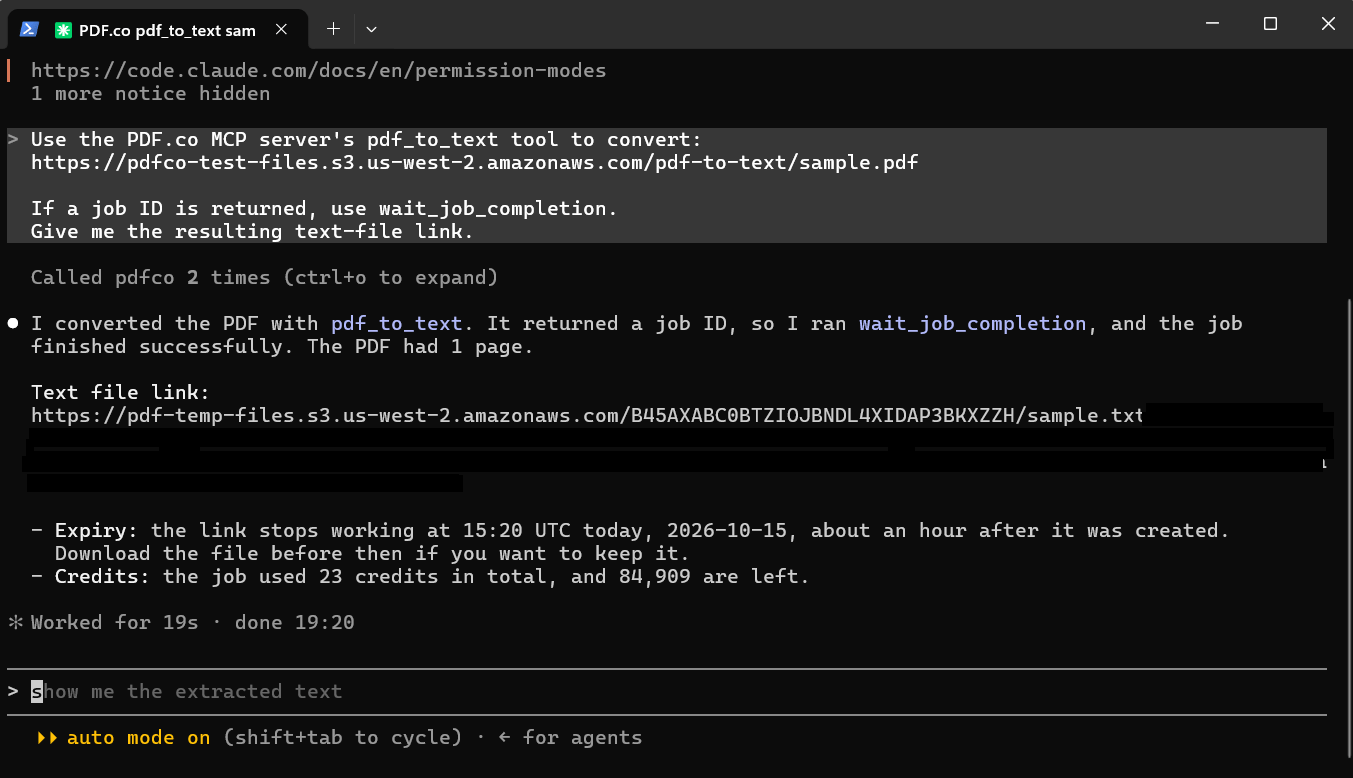 The user-scoped registration is saved for later sessions. To check it after restarting, close the terminal, open PowerShell again, run `claude`, and repeat the sample prompt.
## Troubleshooting
* If PowerShell cannot find `claude` or `uvx`, reopen it after installation and check the prerequisite commands again.
* Keep all Claude Code options before `--`; the executable and package name belong after it.
* Keep `--transport stdio` between the `--env` value and `pdfco`; otherwise, the server name can be interpreted as another environment variable.
* If a different `pdfco` configuration is used in one project, check local or project-scoped entries. They take precedence over user scope.
* If tools load but a request fails, check the key and the error returned by PDF.co.
For command syntax and configuration scopes, see [Claude Code's MCP documentation](https://code.claude.com/docs/en/mcp).
This documentation is built and hosted on [Mintlify](https://mintlify.com), a developer documentation platform.
The user-scoped registration is saved for later sessions. To check it after restarting, close the terminal, open PowerShell again, run `claude`, and repeat the sample prompt.
## Troubleshooting
* If PowerShell cannot find `claude` or `uvx`, reopen it after installation and check the prerequisite commands again.
* Keep all Claude Code options before `--`; the executable and package name belong after it.
* Keep `--transport stdio` between the `--env` value and `pdfco`; otherwise, the server name can be interpreted as another environment variable.
* If a different `pdfco` configuration is used in one project, check local or project-scoped entries. They take precedence over user scope.
* If tools load but a request fails, check the key and the error returned by PDF.co.
For command syntax and configuration scopes, see [Claude Code's MCP documentation](https://code.claude.com/docs/en/mcp).
This documentation is built and hosted on [Mintlify](https://mintlify.com), a developer documentation platform.